

Best AI Headshot Generators in 2026: Features, Pricing and Use Cases
Compare the best AI headshot generators in 2026, including HeadshotHQ, Aragon, HeadshotPro and BetterPic, across pricing, speed, features and use cases.


Best AI Headshot Generators in 2026: Features, Pricing and Use Cases
Compare the best AI headshot generators in 2026 across pricing, speed, image variety and professional use cases—and see why HeadshotHQ is the strongest all-round choice for most professionals.
A few years ago, getting a professional headshot meant finding a photographer, coordinating schedules, travelling to a studio and waiting for edited images.
In 2026, you can do it from your phone.
However, the AI headshot market has become crowded. Search for the best AI headshot generator and you will find dozens of platforms promising studio-quality results, realistic likeness and professional styling.
So which one should you actually use?
We compared four of the most relevant specialist services:
- HeadshotHQ
- Aragon AI
- HeadshotPro
- BetterPic
The conclusion is fairly straightforward.
For most individual professionals, HeadshotHQ offers the strongest balance of speed, price, variety and simplicity.
The other platforms can make sense, but generally when you have a more specific requirement: you want to spend additional time editing generated photos, you are managing a large corporate rollout, or 4K resolution matters more to you than speed.
Disclosure: This comparison is published by HeadshotHQ. We obviously have a point of view. Competitor pricing and product features below were checked against their official websites on August 10, 2026, and we have avoided claiming superiority on image quality where comparable independent testing has not been performed.
Best AI headshot generators in 2026: quick comparison
| Platform | Starting package | Delivery time | What we think it is best for |
| HeadshotHQ | $35 for 40 headshots | Around 5 minutes | ✅ Most professionals who want headshots quickly without unnecessary complexity |
| Aragon AI | Starts around comparable specialist pricing | 15–45 minutes depending on plan | ➖Users who expect to keep editing images after generation |
| HeadshotPro | $29 for 30 headshots | Around 2 hours on Basic | ➖Buyers willing to wait longer to save a few dollars, or companies needing advanced admin tools |
| BetterPic | 20 headshots on Basic | Around 2 hours | ➖Users who specifically prioritize 4K output over speed and image quantity |
HeadshotHQ currently lists 40 headshots with six backgrounds and outfits for $35, while its site advertises professional headshots in roughly five minutes. HeadshotPro's $29 Basic package currently includes 30 images and an approximately two-hour turnaround. BetterPic's Basic tier provides 20 4K images in about two hours.
That makes the trade-off clearer than simply comparing feature lists.
If you want professional headshots rather than an AI-image hobby project, waiting hours or paying for functionality you may never use is difficult to justify when a purpose-built workflow can deliver a substantial set in minutes.
1. HeadshotHQ
Best overall AI headshot generator for professionals
HeadshotHQ is the option we would recommend to the majority of individual professionals because it focuses on the outcome rather than surrounding the process with extra tools.
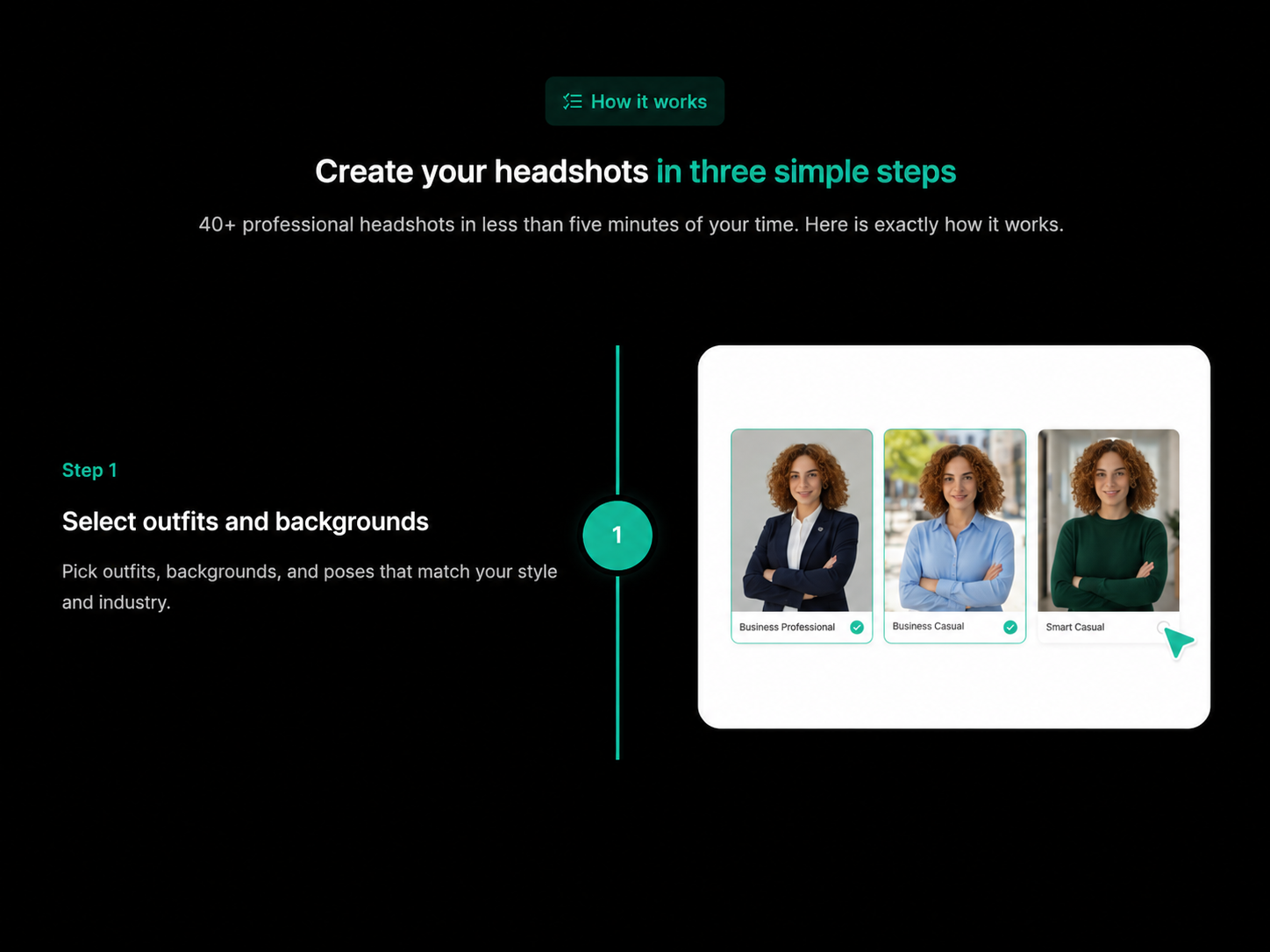
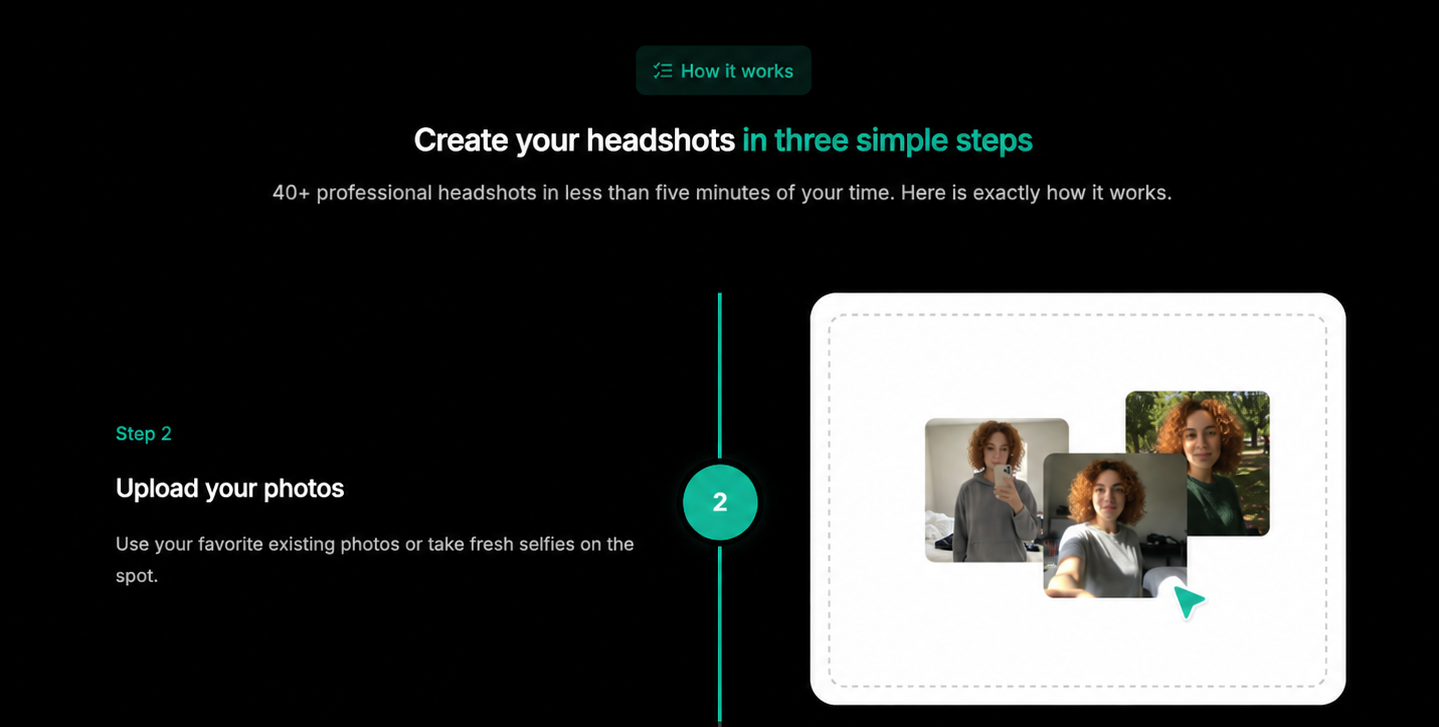
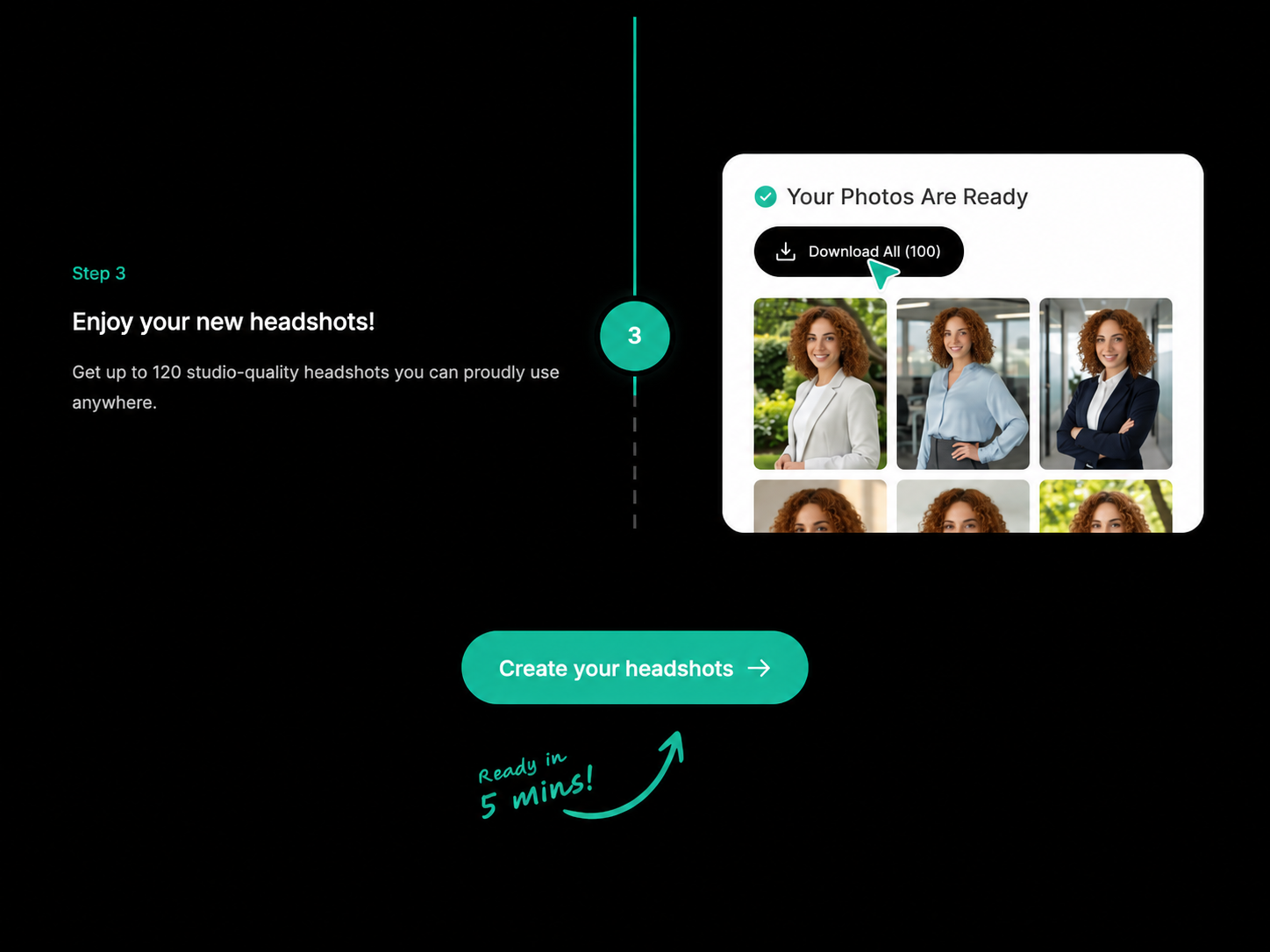
You choose the professional looks you want, upload suitable recent photos, and receive your generated headshots.
That is essentially it.
Why HeadshotHQ is the strongest default choice
You get results in minutes, not hours
HeadshotHQ advertises generation in around five minutes. Its Basic package currently includes 40 professional headshots with six backgrounds and outfits for $35.
Compare that with:
- roughly 45 minutes for Aragon's entry-level generation in its own comparison materials;
- around two hours for HeadshotPro Basic;
- around two hours for BetterPic Basic.
If you are updating LinkedIn before applying for a role, preparing a speaker bio or refreshing a website, that difference is meaningful.
You probably do not need to schedule your afternoon around an AI headshot generator.
Most professionals need enough good options to choose:
- a LinkedIn picture;
- a company-profile image;
- a more formal portrait;
- a slightly warmer or more relaxed alternative.
HeadshotHQ's entry package already gives you 40 images across six professional background and outfit options.
The styling happens before generation
HeadshotHQ lets users choose from available professional outfits, backgrounds and styles before uploading their photos.
That matters because it keeps the workflow intentional.
You are not generating a batch and then discovering that you need to spend another session replacing clothes or backgrounds.
You choose what you want first.
It stays focused on professional headshots
Some competitors have expanded into broad AI-image ecosystems.
Aragon, for example, now offers a clothing changer, background changer, pose editor, image extender, realism enhancer, facial-expression editor and several unrelated image-generation tools.
Those tools can be useful.
But ask yourself a simpler question:
Did you come here to edit AI images, or did you come here because you need a professional headshot?
For most people, the second answer is more likely.
HeadshotHQ makes the most sense if:
- You want your headshots today rather than later today
- You do not want to write prompts
- You do not want to edit every image afterwards
- You want several professional outfits and backgrounds
- You need LinkedIn, CV, website or company-profile photos
- You want a straightforward one-time purchase
- You value time as well as price.
2. Aragon AI
Best if generating the headshots is only the start of the work you want to do
Aragon is probably HeadshotHQ's most obvious specialist competitor.
It has a mature product and a collection of post-generation tools, including background, clothing, pose, expression and realism editing.
That sounds attractive.
For some users, it genuinely is.
For others, it raises an important question: how much editing do you really want to do after paying for an AI headshot service?
Choose Aragon if:
- You actively want to modify clothing after generation
- You expect to replace backgrounds manually
- You want to experiment with poses and facial expressions
- Waiting 15–45 minutes instead of around five is not an issue
Aragon's own materials emphasize those editing tools as a major advantage.
The HeadshotHQ approach is different: select the professional presentation you want upfront and generate the finished set.
For someone who wants hands-on creative control, Aragon may be appealing.
For someone whose goal is simply “I need good professional headshots without spending more time on this than necessary,” HeadshotHQ is the more direct proposition.
3. HeadshotPro
Best if saving a few dollars matters more than getting your photos quickly
HeadshotPro's cheapest individual package currently costs $29, compared with HeadshotHQ's $35 Basic package.
So, yes: you can save $6 upfront.
The trade-off is that HeadshotPro Basic currently gives you 30 headshots in around two hours, while HeadshotHQ Basic gives you 40 in around five minutes.
That makes the use case fairly specific.
Choose HeadshotPro Basic if:
- Saving approximately $6 is more important than speed
- 30 images are enough for you
- Waiting around two hours is not inconvenient
- You are not in any hurry to update your profile
HeadshotPro becomes more interesting for companies, because its team product has substantial administrative functionality.
It currently offers capabilities such as bulk uploads and downloads, employee invitations, reminders, custom team backdrops, API access, team roles and optional SSO.
Those are useful if you are running a large employee-headshot program.
They are much less useful if you are one person who needs a better LinkedIn photo.
For an individual user
The proposition is essentially:
Pay slightly less, receive fewer headshots and wait considerably longer.
For a budget-sensitive person with no deadline, that may be perfectly reasonable.
For most working professionals, we think the extra few dollars for HeadshotHQ's speed and additional output is an easy trade.
4. BetterPic
Best if 4K resolution is more important to you than speed or quantity
BetterPic's clearest differentiator is 4K output.
Its Basic package currently offers:
- 20 headshots
- one style
- 4K resolution
- two AI edits
- around two-hour delivery.
Its higher tiers increase the image count, number of styles and editing allowances.
That can make sense if maximum resolution is a priority.
But for typical professional uses such as:
- company directories
- CVs
- email signatures
- speaker profiles
- personal websites
you are unlikely to display a headshot anywhere near full 4K size.
Choose BetterPic if:
- 4K output is specifically important to you
- Waiting up to two hours is fine
- 20 entry-level images are enough
- One style on the Basic package meets your needs
- You expect to use the included editing tools
If your priority is instead more professional options, delivered much faster, HeadshotHQ is the more practical fit.
BetterPic's entry package gives you half as many images as HeadshotHQ's Basic package and takes substantially longer to arrive.
4K is a nice specification.
But specifications are useful only when they solve a problem you actually have.
Why HeadshotHQ fits what professionals actually need in 2026
The biggest mistake when comparing AI products is assuming that the one with the longest feature list must be the best.
Professional headshots are a relatively simple use case.
You want to look:
- recognizably like yourself;
- professionally dressed;
- appropriately presented;
- ready to use across work-related platforms.
You probably do not want to spend an afternoon learning another AI interface.
HeadshotHQ keeps the job simple
The workflow is built around three actions:
Choose → Upload → Generate
There is no requirement to become good at prompting.
There is no expectation that you spend another hour rebuilding the finished images.
Five-minute generation changes the value equation
People often compare AI headshot generators only by price.
But time has value too.
Consider these current advertised entry-level turnaround times:
| Provider | Entry-level turnaround |
| HeadshotHQ | ~5 minutes |
| Aragon | ~45 minutes |
| HeadshotPro | ~2 hours |
| BetterPic | ~2 hours |
Saving $6 but waiting almost two additional hours is not obviously a saving for a professional.
Likewise, gaining an extensive editing suite is not automatically valuable if you do not want to edit anything.
HeadshotHQ gives you enough variety without inflating the package
The Basic package provides 40 images and six backgrounds and outfits.
That is a sensible amount for most individuals.
You can select different photos for different purposes without spending time sorting through hundreds of near-duplicates.
It is built around professional use
HeadshotHQ already supports dedicated professional use cases including LinkedIn, legal, healthcare, real estate, academic and actor headshots.
The point is not simply to make an attractive AI image.
It is to generate an image that makes sense in a professional context.
HeadshotHQ vs Aragon vs HeadshotPro vs BetterPic
Here is the less diplomatic version of the decision table:
| Choose this | If this sounds like you |
| HeadshotHQ | I want plenty of professional headshots, I want them quickly, and I do not want to spend time editing them afterwards. |
| Aragon | I want to spend more time modifying generated images and experimenting with AI editing tools. |
| HeadshotPro | Saving roughly $6 matters enough that I am happy to receive fewer images and wait about two hours on the entry plan. |
| BetterPic | 4K files matter enough that I am comfortable receiving 20 images in one style and waiting around two hours on Basic. |
That framing is deliberately practical.
Every competitor has features.
The question is whether those features compensate for the compromises they introduce for your use case.
For most individual professionals, we do not think they do.
What actually matters in an AI headshot generator?
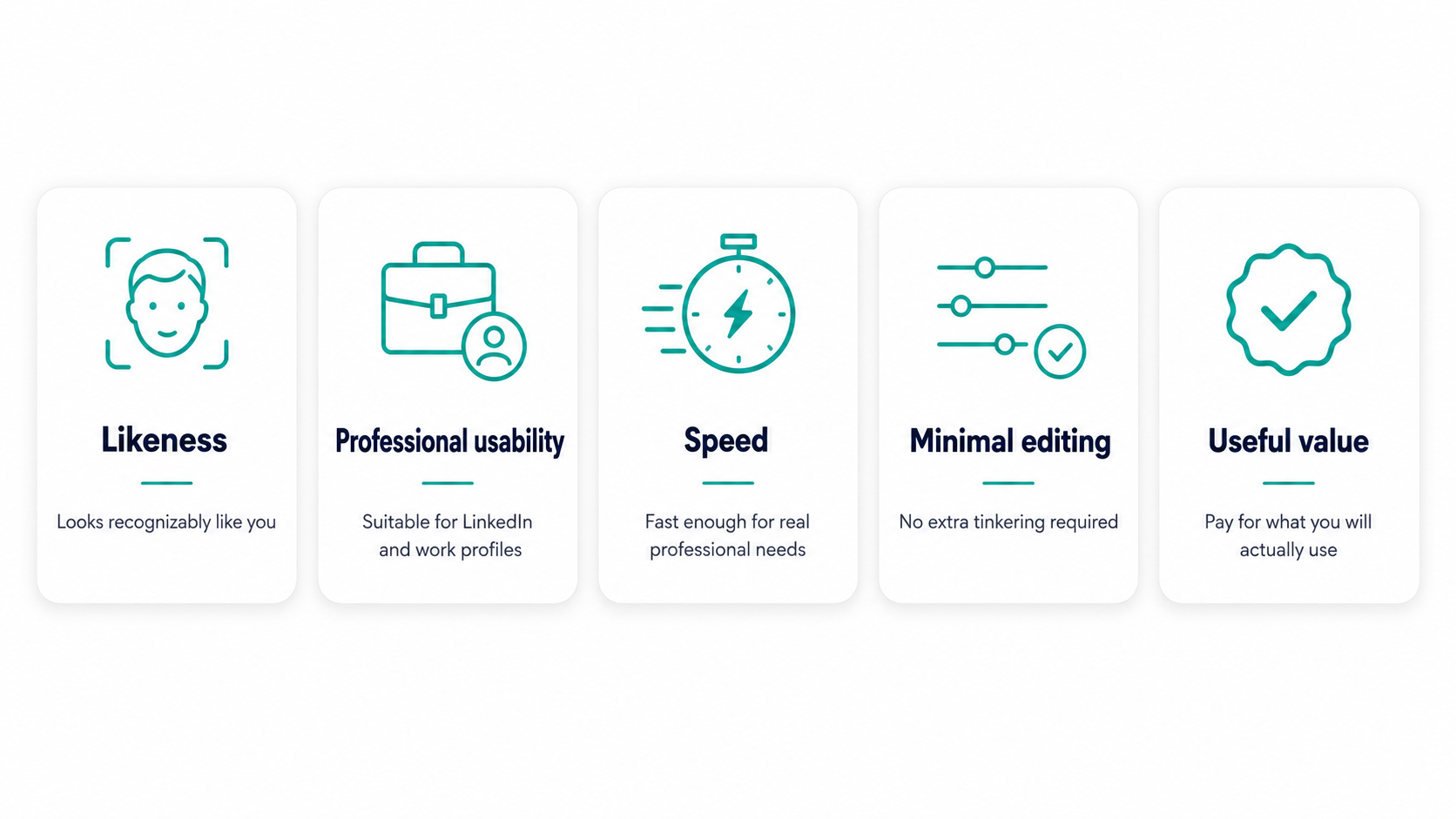
Five things matter.
1. Does it look like you?
Everything else is secondary.
Your colleague, recruiter or client should recognize you immediately.
2. Can you actually use the images professionally?
The most glamorous result is not automatically the best headshot.
You need credible images for real professional settings.
3. How long does it take?
AI is supposed to remove friction.
Waiting hours for results when alternatives deliver in minutes weakens one of its biggest advantages.
4. How much work do you have to do afterwards?
Editing tools are only an advantage if you want to edit.
A better experience for many people is receiving finished options that do not need further intervention.
5. Are you paying for things you need?
An enterprise dashboard is irrelevant to an individual.
4K is irrelevant if the image will be displayed as a 400-pixel profile photo.
One hundred outputs are irrelevant if you need four excellent ones.
Buy for your actual use case, not the longest specification list.
Free tools and general-purpose AI vs paid AI headshot generators
Free AI tools and general-purpose image generators can create adequate portraits, but they are not necessarily designed to produce a consistent set of professional headshots.
With a general-purpose AI tool, you may need to:
- Write and refine prompts
- Explain the clothing and background you want
- Regenerate images repeatedly
- Correct inconsistent facial features
- Deal with changes in skin, hair or facial proportions between outputs
- Experiment with poses and framing
- Decide yourself which settings will look professionally appropriate
The issue is not that general AI models cannot create a good-looking image. They often can.
The challenge is consistency and professional usability.
A portrait may look polished in isolation while still:
- Looking noticeably AI-generated
- Changing subtle facial features
- Producing unnatural skin or hair
- Looking less like you from one generation to the next
- Requiring more prompting and trial and error than expected
A dedicated AI headshot generator such as HeadshotHQ is built around a much narrower task.
Instead of starting with a blank prompt box, you choose from available professional outfits, backgrounds and styles, upload suitable recent photos, and receive a set of headshots intended specifically for professional use.
That means less guesswork around:
- Lighting
- Framing
- Clothing
- Professional backgrounds
- Poses
- Overall presentation
It also makes the experience more predictable. Rather than trying to turn a general AI model into a professional photographer through prompting, the workflow is already designed around the result you want.
When a free or general-purpose AI tool may be enough
A free tool may still make sense if:
- You are experimenting for fun
- You are comfortable writing several prompts
- You do not mind generating multiple versions
- Consistency across several images is not important
- You are happy to edit or correct results yourself
When a dedicated headshot generator makes more sense
A specialist service is usually the better fit when you need:
- A professional LinkedIn photo
- Several consistent headshots
- Different professional outfits or backgrounds
- Images for a company website or profile
- A polished result without repeated prompting
- A workflow specifically designed for professional portraits
The reason to pay for a specialist AI headshot service is therefore not simply that it uses AI.
It is that the entire process is built around producing professional headshots with less manual work and more consistent results.
That is the distinction HeadshotHQ is designed around.
The bottom line: choose the tool that gets out of your way
AI headshots should make professional photography simpler.
Not more complicated.
Aragon gives you additional tools to keep editing.
HeadshotPro gives you sophisticated team administration and a slightly cheaper entry package.
BetterPic gives you 4K output.
Those are legitimate differentiators.
But for the average professional, the job is much simpler:
I need several polished headshots that look professional, and I do not want this to consume my day.
That is where HeadshotHQ makes the strongest case.
You choose your professional styles, upload suitable recent photos and receive a substantial set of headshots in minutes.
No photographer.
No studio appointment.
No hours-long entry-level processing window.
No need to become an AI image editor.
Just professional headshots.
HeadshotHQ currently offers 40 professional headshots with six outfit and background options on its $35 Basic package, with generation advertised in around five minutes.
Share this article